MG5 Wireless Gaming Mouse
$59.99
For RK Blog Readers Only
The right wireless mechanical keyboard depends on what you need it to do. Gaming performance, battery life, device switching, layout, and everyday usability can all play a role in finding the right fit.
For gaming, low-latency 2.4GHz connectivity and polling rate may be the priority. For work or multi-device use, Bluetooth connectivity, battery life, and layout can matter more. Some users may prefer a compact keyboard for a simpler, more streamlined setup, while others need a numpad for everyday productivity.
In this guide, we’ll break down the key factors to consider when choosing a wireless mechanical keyboard and highlight four RK models designed for different needs and use cases.

| Best For | Keyboard | Layout | Connectivity | Why It’s a Good Fit |
|---|---|---|---|---|
| Compact setups | R75 Wireless | 75%, 81 Keys | 2.4GHz + Bluetooth + Wired | Bluetooth connects with up to three devices, while QMK/VIA lets you customize your keyboard to fit the way you work and play. |
| Work + gaming | S98 | 96%, 96 Keys | 2.4GHz + Bluetooth + Wired | Bluetooth supports up to three devices, while the built-in screen makes it easy to check and switch between connections. |
| Competitive gaming | R99 | 96%, 101 Keys | 2.4GHz + Bluetooth + Wired | 8K polling over 2.4GHz, a 0.125 ms polling interval, and SOCD support give competitive gamers the wireless performance they need. |
| Full-size productivity | S104 | Full-size, 104 Keys | 2.4GHz + Bluetooth + Wired | An 8,000 mAh battery delivers up to 63 hours with RGB on, making it a dependable full-size keyboard for longer use between charges. |
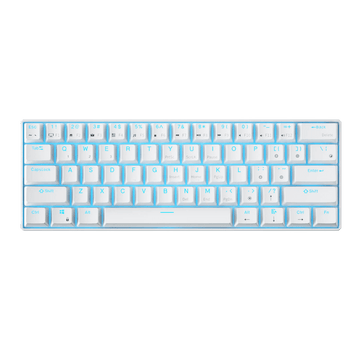
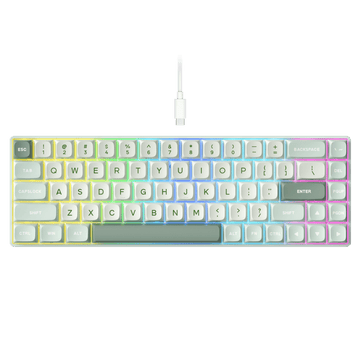
For a compact wireless setup, the R75 PRO offers a 75% layout that keeps the function row while taking up less space than a TKL or full-size keyboard. That makes it a practical fit for smaller desks, especially if you want more room for your mouse without moving down to a 60% layout.
The R75 PRO supports 2.4GHz, Bluetooth, and wired connections. Its Bluetooth mode can connect with up to three devices, so you can switch between a desktop, laptop, and tablet without changing keyboards. For gaming, 2.4GHz provides a faster wireless connection, while wired USB is available when you want a direct connection.
It also supports QMK/VIA for key remapping and function customization. And if keyboard sound is part of the experience you're looking for, the R75 PRO has a creamy sound profile that suits everyday typing.
Best for: Smaller desks, everyday work and gaming, multi-device setups, and users who want a customizable 75% wireless keyboard.
The S98 is a 96% wireless mechanical keyboard that keeps a dedicated numpad while taking up less horizontal space than a traditional full-size board. It works well for users who regularly switch between work and gaming, especially if you use spreadsheets, numbers, or other tasks that benefit from a numpad.
It supports 2.4GHz, Bluetooth, and wired connections. Bluetooth can connect with up to three devices, and the built-in screen makes it easier to see and switch between connected devices. You can use 2.4GHz for gaming, Bluetooth when working across multiple devices, or wired USB when you prefer a direct connection.
For users who want one keyboard for both work and gaming, the 96% layout also avoids the main trade-off of smaller keyboards: you keep the numpad without moving to a full-size footprint.
Best for: Work and gaming, multi-device setups, spreadsheet users, and anyone who needs a numpad without a traditional full-size keyboard.
The R99 is designed for gamers who want high-performance wireless connectivity without giving up features built around competitive play. Its 2.4GHz connection supports an 8K polling rate with a 0.125 ms polling interval, while SOCD support adds another gaming-focused feature for fast-paced play.
The design follows the same gaming-oriented approach. Its futuristic, cyberpunk-inspired keycaps are paired with a curved RGB light bar that adds a more distinctive look to a gaming setup without relying on a separate lighting setup.
The R99 supports 2.4GHz, Bluetooth, and wired connections, so you can switch to Bluetooth for everyday devices or use USB when you prefer a direct connection. That makes it suitable beyond gaming, while its high-polling 2.4GHz mode remains the main reason to choose it for competitive play.
Best for: Competitive gaming, fast-paced games, high-performance 2.4GHz wireless, and users who want a gaming-focused design with SOCD support.
The S104 is for users who still want the complete full-size layout, including a dedicated numpad and navigation keys, without giving up wireless connectivity. It supports 2.4GHz, Bluetooth, and wired connections, making it easy to use across work, browsing, gaming, and everyday tasks.
Its 8,000 mAh battery is particularly useful for a keyboard designed to stay on your desk long term. RK rates it for up to 63 hours of use with RGB on, giving you plenty of runtime before you need to reach for the charging cable.
The S104 also includes a TFT display and rotary knob for controls and information without changing the familiar full-size layout. If you prefer keeping a dedicated numpad and having everything in its expected position, it is a practical option for a long-term everyday setup.
Best for: Productivity, heavy numpad use, larger desks, and users who want a full-size wireless keyboard built for long-term use.
Before choosing a wireless mechanical keyboard, there are a few key factors worth considering. The right balance depends on how you plan to use it, from everyday work and multi-device setups to gaming.
Layout and size: Start with the keys you use most often. If you mainly type, browse, and game and rarely use a numpad, a 75% or TKL layout gives you more room for your mouse while keeping the function row and essential navigation keys. If you regularly use spreadsheets or enter numbers, a 96% or full-size layout with a dedicated numpad may be a better fit. The goal is not to choose the smallest keyboard, but to choose a layout that keeps the keys you actually need. For a more detailed breakdown, check out our Keyboard Buying Guide.

Battery life: A wireless keyboard is most convenient when you do not have to think about charging it frequently. Battery capacity, RGB lighting, connection mode, and other features can all affect runtime. When comparing keyboards, look at the rated battery life and the conditions behind that figure rather than comparing battery capacity alone.
Gaming performance: If gaming is a priority, think about the types of games you actually play. For competitive FPS games such as Valorant, Counter-Strike 2, and Call of Duty, low latency, a high polling rate, and responsive 2.4GHz wireless are worth paying attention to. For movement-heavy games such as Fortnite and Apex Legends, features like Rapid Trigger can be useful, while SOCD is more relevant to players who want additional control over movement inputs. If you mostly play casually, these features are less important, and a reliable wireless connection may be all you need.
Switches and typing feel: Wireless performance affects how a keyboard connects, but the switches determine how it feels every time you type or play. Think about whether you prefer a smoother linear feel, more noticeable tactile feedback, or a clickier typing experience. If you are not sure which switch is right for you, our A Comprehensive Guide to Mechanical Keyboard Switches: Types, Feel, Sound & How to Choose breaks down the main switch types, their feel and sound, and what to look for when choosing a keyboard. If you like experimenting with different switches, also check whether the keyboard is hot-swappable.

Device compatibility: If you use one keyboard across a desktop, laptop, or tablet, check its operating system and connection support. Most RK wireless mechanical keyboards work with both Windows and macOS and support multiple connection methods, while specific Bluetooth multi-device capabilities vary by model.
Connectivity: Consider how you plan to connect the keyboard to your devices. Different wireless technologies are better suited to different situations, so it is worth understanding the differences between 2.4GHz and Bluetooth before making a decision.
When choosing a wireless mechanical keyboard, the connection you use can make a noticeable difference depending on how you plan to use it. 2.4GHz is generally the better choice for gaming, while Bluetooth is more convenient for everyday work, laptops, tablets, and multi-device setups.
| Connection | Best For | Main Advantage |
|---|---|---|
| 2.4GHz | Gaming and fast input | Low-latency wireless performance |
| Bluetooth | Work, laptops, tablets, and everyday devices | Convenient multi-device connectivity |
| Wired USB | Wired use and charging | Direct connection with no wireless dependency |
What does tri-mode mean?
A tri-mode mechanical keyboard supports three connection methods: 2.4GHz wireless, Bluetooth, and wired USB. This gives you the flexibility to use the same keyboard across different devices and situations.

For gaming, 2.4GHz is usually the connection to choose. It offers lower-latency wireless performance than Bluetooth, making it better suited to fast inputs and competitive play. Performance-focused keyboards such as the R99 can take 2.4GHz further with high polling rates designed for faster input updates during gaming.
Bluetooth is more useful when convenience and device compatibility matter more than latency. If you regularly switch between a desktop, laptop, tablet, or other compatible devices, Bluetooth makes it easier to use one keyboard across your setup. Some RK keyboards support up to three Bluetooth devices, allowing you to switch between them without repeatedly pairing the keyboard.
Wired USB is still useful even on a wireless keyboard. It provides a direct connection when needed and also lets you continue using the keyboard while it charges.
For users who switch between gaming, work, and multiple devices, tri-mode connectivity offers the most flexibility: 2.4GHz for low-latency gaming, Bluetooth for everyday wireless use, and USB when you want a direct connection or need to charge.
Yes. A wireless mechanical keyboard can work well for gaming, especially when it uses a low-latency 2.4GHz connection.
For casual gaming, Bluetooth may be sufficient for some users, but 2.4GHz is generally the better choice when responsiveness matters. For competitive gaming, connection stability, polling rate, and gaming-specific features are also worth considering if fast and consistent input is a priority.
The R99 is one example of a keyboard built around this kind of performance-focused wireless gaming, while still offering Bluetooth and wired connections for everyday use outside of gaming.
For most gamers, the key is not simply choosing between wireless and wired. Instead, look at the type of wireless connection, latency, polling rate, and gaming features to make sure the keyboard matches how you play.
The right wireless mechanical keyboard depends on how you use it. Instead of looking for one keyboard with every possible feature, start with the way you actually plan to use it and narrow your options from there.
| If This Sounds Like You... | Start With | Choose Something Else If... |
|---|---|---|
| I want a compact keyboard that can switch between several devices | R75 Wireless | You regularly need a numpad → look at S98 |
| I need a numpad for work but do not want a traditional full-size keyboard | S98 | You prefer a traditional full-size layout and longer battery life → look at S104 |
| Wireless gaming performance matters most to me | R99 | 8K polling and SOCD are not important to you → another model may offer better everyday value |
| I want full-size and fewer charging breaks | S104 | You want to keep the numpad but save desk space → look at S98 |
If you are still deciding between keyboard sizes or wireless connection types, use the sections above to narrow down the options that fit the way you work and play.
Think about which features you will actually use before spending more. If you do not need a numpad, high polling rates, or a full-size layout, paying extra for those features may not improve your everyday experience. Start with the features that match your main use case, then compare current prices between the models that fit.
There is no single layout or feature set that works for everyone. The best choice is the keyboard that gives you the features you will actually use.
Ready to choose? Explore all RK wireless mechanical keyboards →
Do wireless mechanical keyboards have input lag?
They can, but modern 2.4GHz wireless keyboards can deliver very low latency. For gaming, 2.4GHz is generally a better choice than Bluetooth when responsiveness matters.
How long does a wireless mechanical keyboard battery last?
Battery life varies by keyboard, connection mode, RGB usage, and other features. Larger batteries can help extend runtime, but actual usage matters more than capacity alone.
Can you use a wireless mechanical keyboard while charging?
Many tri-mode keyboards can switch to a wired USB connection while charging, so you do not have to stop using the keyboard when the battery is low.
Are wireless mechanical keyboards good for work?
Yes. Bluetooth is especially convenient for laptops and multi-device setups, while layouts such as 96% and full-size are useful when you regularly work with numbers or spreadsheets.
What is the best wireless mechanical keyboard for typing?
It depends on your preferred layout and switch feel. The R75 is a good fit if you want a compact typing setup with QMK/VIA customization, while the S98 and S104 make more sense if your daily typing also involves frequent number entry or spreadsheet work.
Are wireless mechanical keyboards worth it?
For many users, yes. A good wireless mechanical keyboard can combine the feel of a mechanical board with a cleaner desk setup and flexible connectivity for gaming, work, and everyday use.