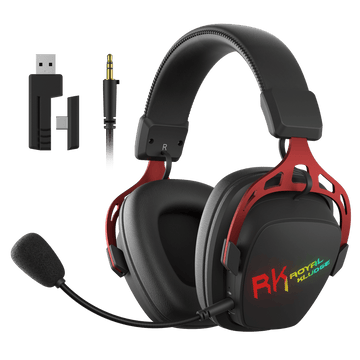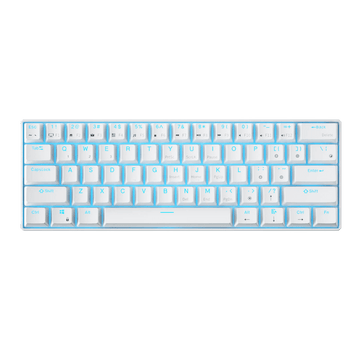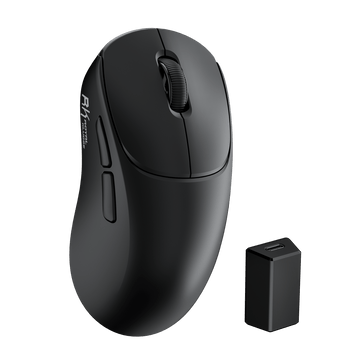
MG5 Wireless Gaming Mouse
$59.99
For RK Blog Readers Only
If your wrists are throbbing after a four-hour shift or a long gaming session, your keyboard is likely the culprit. Most standard designs force your hands into a strained position that leads to ulnar deviation—a fancy term for bending your wrists outward—which is a fast track to carpal tunnel syndrome.
In 2026, finding an effective keyboard for wrist pain doesn't have to be a major investment. This guide breaks down the simple science of why your hands hurt and which features actually provide relief. Based on those principles, we’ve selected 4 budget-friendly ergonomic keyboards and 2 matching mice that offer a great balance of design and value. Here is everything you need to know to find the best ergonomic keyboard and peripherals for your setup without breaking the bank.

● The Remote Worker: You’re typing 8+ hours a day and your hands are starting to feel "heavy" or fatigued.
● The Ergonomic Beginner: You want to try an angled layout but want a seamless transition from a standard board.
● The Healthy Gamer: You need lightning-fast reaction times but refuse to sacrifice your long-term joint health.
● The Laptop Traveler: You work from cafes and need something slim that actually fits in a laptop sleeve.
An ergonomic keyboard isn't just a marketing gimmick or a "cool shape." To actually prevent pain, a keyboard needs to address the three physical stressors that lead to Repetitive Strain Injuries (RSI). Here is why your current standard setup might be causing you trouble:
Most standard rectangular keyboards force you to bend your wrists outward toward your pinkies to keep your fingers on the home row. This "kink" compresses your carpal tunnel and inflames the surrounding tendons.
● The Fix: A "V-shaped" or Alice layout angles the keys so your wrists remain perfectly straight, following the natural, relaxed line of your forearms.

Most mechanical keyboards are thick and tall. Typing on one without proper support forces your wrists to "cock" upward to reach the keys, putting constant, massive pressure on the median nerve.
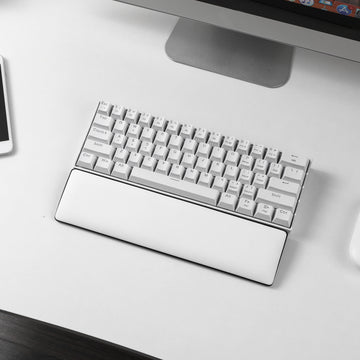
● The Fix: Using an Integrated Wrist Rest to lift your palms, or switching to a Low-Profile (thin) design, ensures your hands stay at a neutral $180^\circ$ angle with your arms.

Cheap membrane keyboards often require you to "mash" or "bottom out" the keys with significant force to make them register. This repetitive impact travels straight from the plastic into your finger joints.
● The Fix: High-quality switches and Gasket-mounted builds act as shock absorbers. They allow for a "light touch," so you can glide across the keys with minimal joint impact. If you're not familiar with Mechanical switches, we recommend reading A Comprehensive Guide to Mechanical Keyboard Switches.

We don't just pick keyboards based on looks. We evaluated dozens of models based on a specific 14-point research framework to see which ones actually help you work longer with less pain.
| Category | What We Look For | Why It Matters to You |
|---|---|---|
| The Must-Haves | Natural Shape (Alice/V-Shape) | Keeps your wrists straight instead of twisted (Ulnar Deviation). |
| Easy-Press Keys (Hot-Swap) | Allows for Light Linear switches to minimize finger joint impact. | |
| Hand-Size Geometry | Ensures you don't have to overextend your fingers to reach the keys. | |
| Build Quality | An ergo investment should feel sturdy and premium under-hand. | |
| Better Comfort | Built-in Wrist Support | Lifts your palms so your wrists stay flat and neutral. |
| Super-Thin Design | Lowers the height to reduce forearm muscle strain. | |
| Reliable Wireless | Clears cable clutter to reduce mental fatigue and allow flexible positioning. | |
| Key Wells/Curvature | Minimizes the distance fingers travel to hit the keys. | |
| Extra Perks | Clear Backlighting | Maintains visibility and prevents neck-craning in dim environments. |
| Easy to Carry | Because ergonomics should follow you from the home to the office. | |
| Great Value | Professional health benefits without the "boutique" luxury price tag. |
Based on our criteria, Royal Kludge (RK) stands out for offering professional ergonomics without the custom-board price tag. Here are our top 4 picks:

The V-shape Revolution. This compact 68% board uses the Alice layout to keep your wrists straight.
The Feel: A soft, Gasket-mounted experience that cushions every stroke.
Why we love it: It’s highly portable and features a massive 7500mAh battery—perfect for wireless, pain-free typing on the go.

Efficiency without the strain. A 96-key layout that keeps the Numpad but narrows the board to save your shoulders.
The Feel: Comes with a Magnetic Wrist Rest for a perfectly flat hand-to-arm transition.
Why we love it: Includes USB pass-through ports and smooth, pre-lubed stabilizers for a quiet, professional office feel.

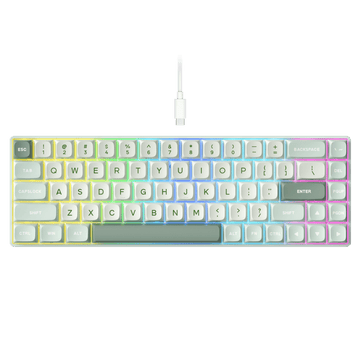
Ultra-thin Ergonomics. This 75% layout sits low on the desk, naturally preventing your wrists from arching upward.
The Feel: Short-travel low-profile switches that require less effort to actuate.
Why we love it: It’s incredibly sleek with a Smart Display & Knob, making it the ultimate tool for hybrid workers and small desks.

Speed meets Health. A high-performance 96% wired board designed for competitive play without the joint fatigue.
The Feel: Magnetic Hall Effect switches allow for a "feather-light" touch and instant response.
Why we love it: Features an 8K Hz polling rate and a dedicated wrist rest, proving you don't have to sacrifice ergonomics for gaming speed.
Don't let a bad mouse undo the benefits of your new keyboard. To complete your setup, choose the tool that fits your pain points:

For those who want pro-gaming specs without the wrist fatigue.
The Edge: Features the flagship PAW3950 Sensor and 8K Hz polling for elite precision.
Ergo Benefit: Its ultra-lightweight design eliminates the "heavy drag" that strains tendons.
Verdict: Best for gamers who need top-tier speed and a light-touch feel.

A budget-friendly vertical mouse built for pure physical relief.
The Edge: Mimics a natural 57° "handshake" position to stop forearm twisting.
Ergo Benefit: Instantly removes pressure from the carpal tunnel and median nerve.
Verdict: Best for office workers already feeling persistent wrist ache or numbness.
Buying the right keyboard is step one. Optimizing how you use it is step two. Here are the expert-level adjustments to turn your desk into a health-first sanctuary:
● The "Light Touch" Secret: Pair your keyboard with Light Linear Switches (35g-45g force). It turns typing into a "glide," saving your finger joints from thousands of pounds of cumulative pressure every year. You can also explore all RK switch options in our Keyboard Buying Guide.

● The 90-Degree Rule: Adjust your chair so your elbows sit at a 90-degree angle. Your keyboard should be at a height where your wrists stay neutral (straight)—not tilted up or down.
● The 20-20-20 Rule for Digital Strain: Every 20 minutes, look at something 20 feet away for 20 seconds. Ergonomics isn't just about your wrists; it’s about reducing the cognitive load and eye strain that leads to "desk fatigue."
● Shoulder Width Alignment: If you use a mouse, try to keep it as close to the keyboard as possible. This is why compact layouts (like 75% Layout Keyboards or 96% Layout Keyboards) are superior—they prevent your shoulder from "reaching" outward, which is a common cause of neck knots.

● The "Next Posture" Philosophy: Remember: The best posture is your next posture. No matter how good your setup is, micro-breaks are essential. Every hour, do a 30-second "reverse stretch"—flex your wrists and shoulders in the opposite direction of your typing pose.
A: It is designed to fit your body’s natural shape. Its primary goal is to stop muscle strain and prevent long-term injuries (RSI) caused by standard flat keyboards.
A: Normal keyboards force your wrists to twist and arch. Ergonomic boards use specialized angles (like the Alice V-shape) or lower heights to keep your joints in a relaxed, "neutral" position.
A: Yes. Scientific research shows that keeping wrists in a neutral alignment reduces pressure on the median nerve, which is the leading cause of Carpal Tunnel syndrome.
A: There is a short adjustment period for your muscle memory. They also tend to be a larger upfront investment and may take up slightly more desk space than a basic "plank" keyboard.
A: Much easier than it looks. Most users are back to full speed within 3 to 5 days. The key positions remain the same as your standard layout; only the angle of the board changes.